
✦ New Release
Related
Announcing Open-Chat: A Sovereign, Local-First 'AI' Platform
Open-chat is a portable, composable, self-hostable platform for sovereign, private and self-controlled 'AI' — now released under AGPL.
Popular topics
Strix Halo 128GB RAM, 100% local LLM agents, my tests

LLMs are sometimes stupid, sometimes impressive, often unpredictable and almost never private. Bigger models are generally hosted in clouds and proprietary, sometimes you can limit access or censor data presented to model providers but almost never you can restrict access fully or be really sure how and when your data is being used.
These are just some of the reasons why you might want to run models locally. But hardware especially graphics cards that can run these models are very pricey and the vram requirement for the more 'mid-range' models just exceeds what is possible with local models.
For some time Apple had an alternative to expensive graphics cards with their m-chip lineup allowing shared VRAM with integrated graphics and CPU, but the prices for higher RAM Mac configurations are still ridiculously high. But now there is a 'cheaper' option available for consumers. For a tb-software project I tested the highest available 128GB RAM configuration of a mini PC with the new strix-halo chip to test it and its ability for running local LLMs.
This article reports our early findings and summarizes some configuration steps and the measurement setup I used. To this point I've tested 5 LLMs and more tests are coming. I also investigated the use and usability of local agents with OpenCode in a companion post: Opencode; Usability with Local LLMs on iGPU w 128GB VRAM.
First I needed to allocate VRAM to the integrated graphics card, I have not played with the 'dynamic' setting here yet. ( I have now tried extending VRAM to 94GB more below )
For these tests I have chosen to set the VRAM to 65536 MiB so there is about 67 GB RAM still available to the CPU. We can also test influence on load speed and inference of varying the available amount of VRAM in the future.

Tests were run on NixOS and to access all the libraries required to use the Ollama Vulkan backend I had to install some additional packages and libraries, specifically I added vulkan-loader to the NixOS system libraries and ran Ollama with OLLAMA_LLM_LIBRARY=vulkan OLLAMA_VULKAN=1 ollama serve. I used amdgpu_top to monitor the VRAM and graphics usage ( It feels like there are still some performance gains to be made, also VRAM is not fully utilized, especially by the smaller models ).
To test the LLMs for now I just wanted to know basic results for load speed and completion speeds. I've created a simple fork of ollama benchmark ( here my fork without telemetry ) to measure the results based on a running Ollama backend.
If you had the exact same hardware, system and configurations, tests could be replicated via:
python3 -m venv venv
source venv/bin/activate
pip install git+https://github.com/tbscode/tims-ollama-bench-fork.git
tims_llm_benchmark run --custombenchmark=<your-model-config>.yml
With models file:
file_name: "<config-name>.yml"
version: 2.0.custom
models:
  - model: "<model-name>"
And run them all via
tims_llm_benchmark run --custombenchmark=model-configs/qwen3-coder-next.yaml
tims_llm_benchmark run --custombenchmark=model-configs/nemotron-3-nano.yaml
tims_llm_benchmark run --custombenchmark=model-configs/glm-4.7-flash.yaml
tims_llm_benchmark run --custombenchmark=model-configs/gpt-oss-120b.yaml
tims_llm_benchmark run --custombenchmark=model-configs/qwen-3.5-122b.yaml
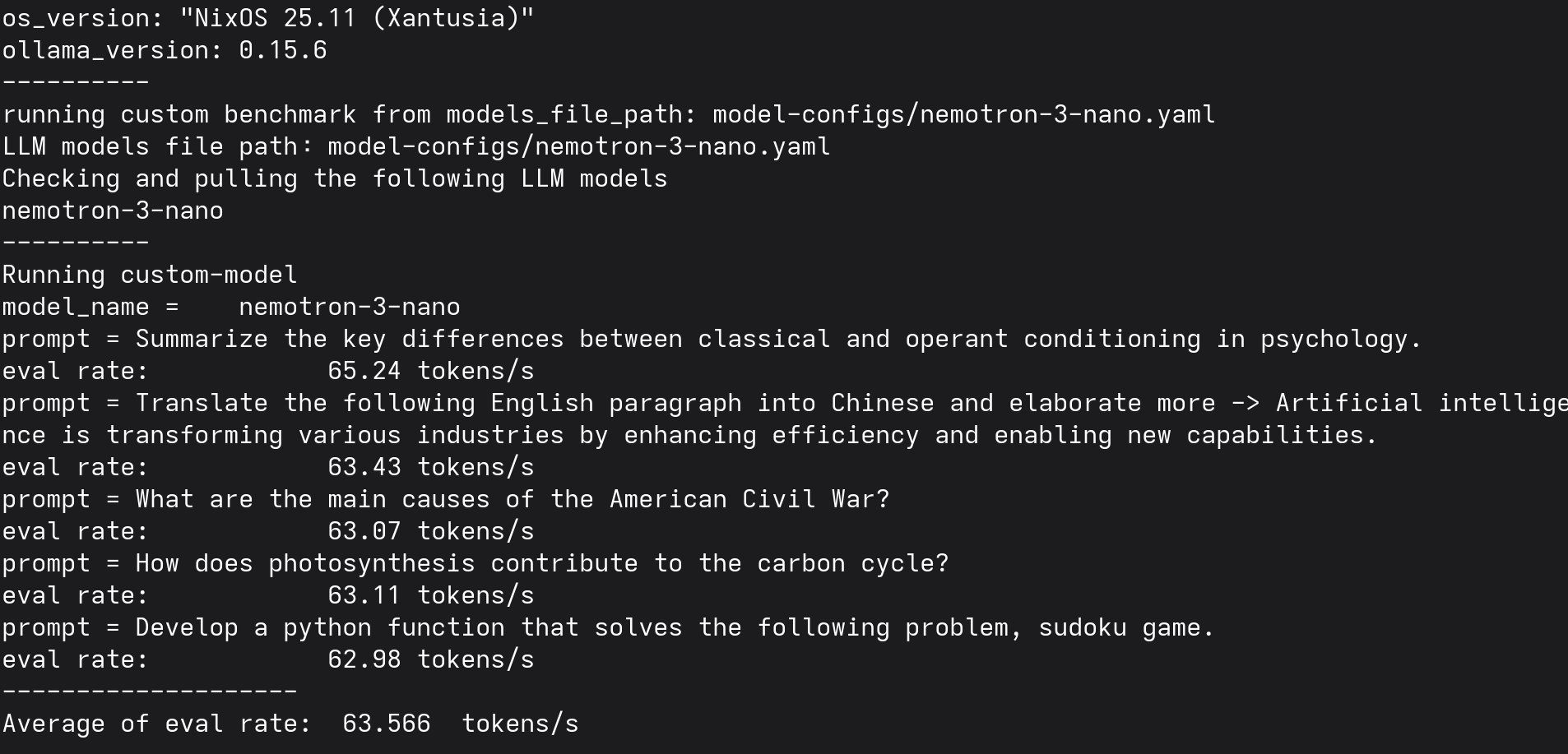
Based on this benchmark and personal prompts and agents tests I've created this table to summarize the results. There are many more tests to be done and likely also performance improvements through improved configuration, these are just my initial findings and a preliminary review. But I can definitely say that there are functional local models out there that can definitely complete simple tasks locally on this hardware!
| Name | Size (GB) | Quality | Load Speed | Tokens / sec |
|---|---|---|---|---|
| qwen3-coder-next | 61GB | 👾👾👾👾👾 | Fast | 35.094 |
| nemotron-3-nano | 34GB | 👾👾👾👾 | Very Fast | 63.566 |
| glm-4.7-flash | 40GB | 👾👾👾👾 | Slow | 50.098 |
| gpt-oss:120b | 70GB | 👾👾👾👾 | Very Slow | 31.532 |
| qwen-3.5:122b | 81GB | 👾👾👾👾 | Very Slow | 19.158 |
| qwen-3.5:9b | 6.6GB | 👾👾👾👾 | Very Slow | 29.52 |
All these models are usable for smaller and simpler local agentic and coding tasks, involving basic files manipulations and tool calls e.g.: via open-code. I was especially impressed by how well qwen3-coder-next performed, and also nemotron-3-nano that was incredibly fast and smart for such a small thinking model.
Now I've updated the bios to allocate 94GB VRAM to allow larger models to run entirely in VRAM.

Here's the active usage with 94GB VRAM allocated:

With the increased VRAM, I was able to download and run qwen-3.5:95b entirely in VRAM:

✦ New Release
Related
Open-chat is a portable, composable, self-hostable platform for sovereign, private and self-controlled 'AI' — now released under AGPL.
Related
Why I think the commoditization of 'AI' has started, how local and open-source models change the equation, and what that could mean for Europe.
Related
Serving Qwen3.8-27B (INT4 AWQ) and Qwen3-4B (FP16) with vLLM on my two-node k3s cluster, fronted by a LiteLLM OpenAI-compatible router.