
Related
The Commoditization of AI, Local AI and the Future of Europe
Why I think the commoditization of 'AI' has started, how local and open-source models change the equation, and what that could mean for Europe.
Popular topics
01 min reading in—DevOpsProgramming
A comprehensive guide to setting up fully self-hosted AI code editing with Codium and Continue.dev, keeping your code and AI interactions completely private and under your control.
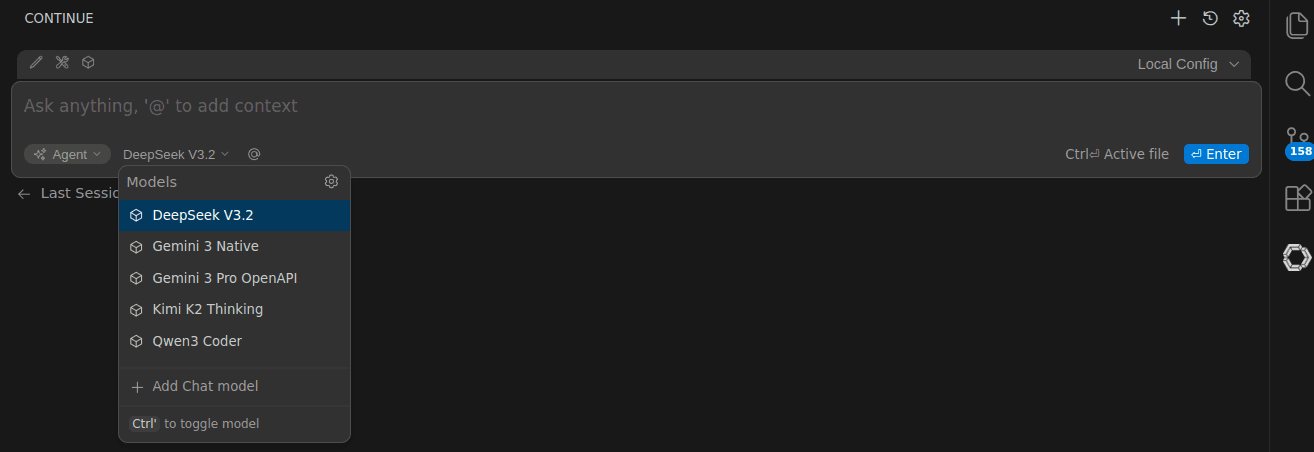
Here’s how I keep AI-assisted coding fully under my control: Continue.dev with Codium, pointed at APIs I trust and models I host. Everything stays local or on endpoints I pick - no mistrius data blackholes, no pricy APIs with uncontrolled token usages. Just own hardware and local storage.
~/.continue/config.yaml
name: My Setup
version: 1.0.0
schema: v1

models:
  - name: "Tims Kimi"
    provider: openai
    model: moonshotai/Kimi-K2-Thinking
    apiBase: https://api.deepinfra.com/v1/openai
    apiKey: <DEEPINFRA_API_KEY>
    roles:
      - chat
      - edit
You can even use Google Models outside of Antrigravity:
  - name: Gemini 3 Native
    provider: gemini
    model: gemini-3-pro-preview
    apiKey: <GOOGLEAI_API_KEY>
There are several tools you can use here; the easiest is probably Ollama with its OpenAI-compatible backend.
e.g.: start qwen coder:
ollama run qwen3-coder:30b
Then include it in your contine.dev configuration:
  - name: "Ollama self hosted"
    provider: openai
    model: qwen3-coder:30b
    apiBase: http://localhost:11434/v1
    roles:
      - chat
      - edit
And now you can edit the code completely privately using a 100% local model.
Microsoft sometimes is a little b**ch, they block the pylint plugin from working with non-official VS Codes. So I recommend using 'basedpyright'; it works with Codium, and honestly in some aspects is even better than pylint.
Related
Why I think the commoditization of 'AI' has started, how local and open-source models change the equation, and what that could mean for Europe.
Related
Serving Qwen3.8-27B (INT4 AWQ) and Qwen3-4B (FP16) with vLLM on my two-node k3s cluster, fronted by a LiteLLM OpenAI-compatible router.
Related
A production-style setup to publish private k3s services through a public microk8s edge cluster using the Tailscale Kubernetes Operator.